

Key Takeaways
- OCI and AWS connect through two supported models: dedicated private interconnect (OCI FastConnect + AWS Direct Connect) and Site-to-Site VPN over IPSec. Each serves a different purpose.
- The right topology is centralized Hub-and-Spoke. One Connectivity Hub VCN per OCI region controls all AWS-bound traffic. This gives you routing ownership, inspection enforcement, and a clean place to troubleshoot.
- BGP runs the routing between OCI DRG and AWS TGW. Route table separation on both sides is the key configuration discipline. Mix route tables and you lose visibility and control.
- All OCI-AWS traffic must pass through the Hub Firewall. The path is enforced through DRG route table rules, not through policy alone.
- Return path symmetry is a hard requirement. Traffic must take the same physical path in both directions or stateful firewalls will drop packets.
- For VPN connections, MSS clamping is required. Tunnel encapsulation overhead causes silent packet fragmentation without it.
- Each OCI region must have its own direct connection to AWS. There is no shared path between regions.
- Production deployments require dual FastConnect circuits and dual Direct Connect connections. Single-circuit configurations are a single point of failure.
- The cost difference between private interconnect and VPN is significant at the fixed infrastructure level, but the right choice depends on workload requirements, not cost alone.
Connecting Oracle Cloud Infrastructure and Amazon Web Services is an architectural decision that affects performance, cost, security, and how easy your environment will be to operate over time. This article walks through the key design decisions you need to make, explains the reasoning behind each one, and gives you a practical reference for building a production-grade OCI-AWS network connection.
VPN or Private Interconnect, and When to Decide
This is the first decision, and it shapes everything that follows. Make it at the start, based on what the workload will look like at steady state, not at launch.
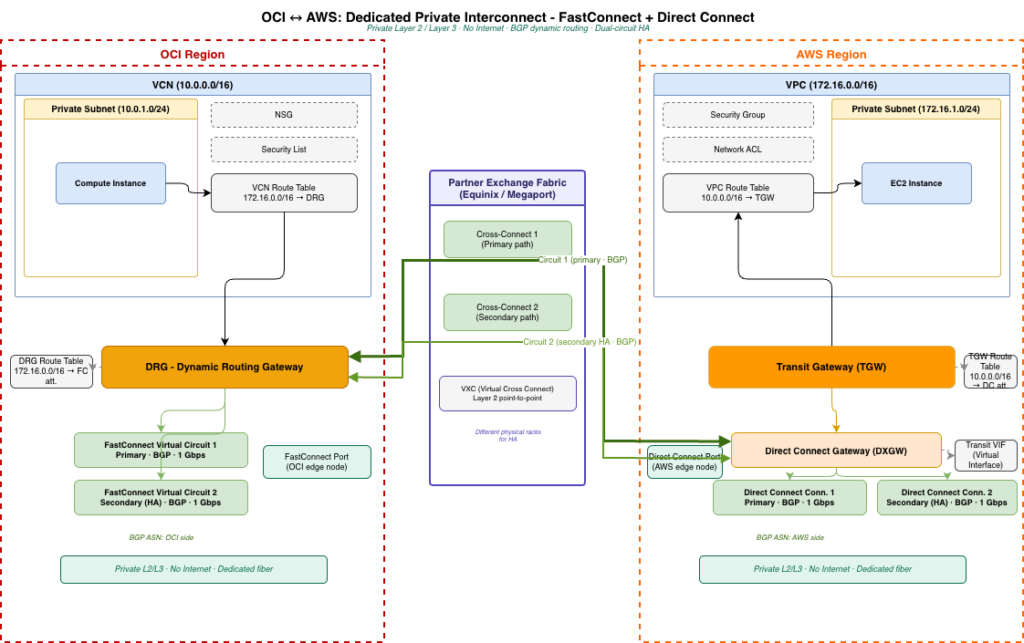
OCI FastConnect combined with AWS Direct Connect provides a dedicated private Layer 2 or Layer 3 connection between the two clouds through a partner exchange facility such as Equinix or Megaport. The connection is private – no internet is involved. BGP runs end to end. If you collocate OCI and AWS in the same metro, round-trip latency runs between 2 and 5 milliseconds. Throughput is high and predictable. This is the right model for production workloads, split-stack architectures where the database runs in OCI and the application runs in AWS, and any workload with a latency requirement below 10 milliseconds.
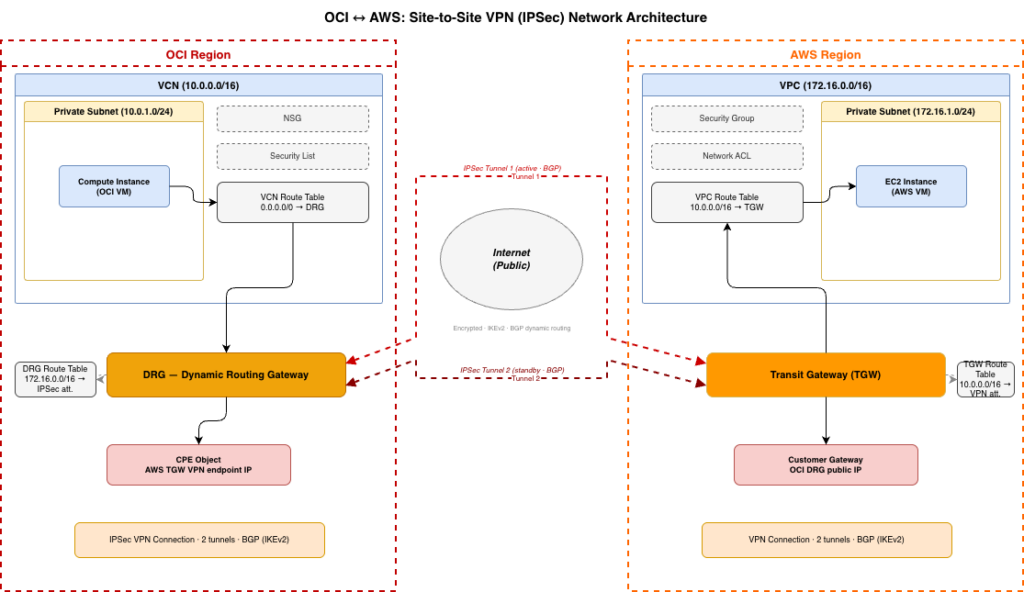
Site-to-Site VPN over IPSec tunnels runs over the public internet. It is faster to deploy – you can have a working connection in hours rather than the two to six weeks that FastConnect provisioning typically takes through a provider. The tradeoff is latency, which varies between 20 and 60 milliseconds depending on geography and internet path quality, and bandwidth, which is limited by the tunnel capacity and internet conditions. VPN is the right model for disaster recovery links, temporary migration connectivity, proof-of-concept environments, and as a backup path when FastConnect is the primary.
Here is a practical decision table:
| Scenario | Right choice |
|---|---|
| Database in OCI, application in AWS | FastConnect + Direct Connect |
| Production workloads, sustained >100 Mbps | FastConnect + Direct Connect |
| DR link, runs mostly idle | VPN |
| Migration window, temporary connectivity | VPN, then upgrade |
| Proof of concept, no SLA | VPN |
| Budget-constrained, sub-100 Mbps, non-critical | VPN |
The factor that matters most is latency, not bandwidth. For split-stack architectures, a database query that crosses the OCI-AWS boundary on every request is acutely sensitive to round-trip time. The difference between 5 ms and 40 ms is visible to end users and measurable in application throughput.
One practical note on timing: FastConnect provisioning requires physical setup at an exchange facility. Start that process early. Teams that plan to migrate from VPN to FastConnect later often find the migration window is awkward because production traffic is already flowing over the VPN path.
The Right Topology: Hub-and-Spoke
The topology that works at scale, and that makes the environment manageable over time, is centralized Hub-and-Spoke. Each OCI region contains one Connectivity Hub VCN. All traffic between OCI and AWS flows through that Hub. The Hub owns the AWS interconnection. The Hub owns inter-region routing. The Hub is where centralized firewall inspection lives.
On the OCI side, the Dynamic Routing Gateway – DRG – is the central routing engine. Every workload VCN in the region attaches to its local DRG. AWS-bound traffic flows from the workload through the local DRG, into the Hub DRG, and out to AWS. The Hub DRG acts as the regional edge for all external traffic.
On the AWS side, the Transit Gateway – TGW – plays the equivalent role. All VPCs attach to the TGW. OCI CIDRs are advertised to the TGW via BGP. The TGW manages routing to OCI for all attached VPCs.
Each OCI region is independent. Region A has its own DRG, its own Hub VCN, and its own direct connection to AWS. Region B has the same. There is no dependency between regions for AWS connectivity. This is an important point that has its own section below.
The centralized model gives you a single place to apply and verify security controls, a single place to see all OCI-AWS traffic, and a single place to troubleshoot when something is not behaving as expected. As the environment grows – more workload VCNs, more AWS VPCs, more teams – the Hub stays stable. The complexity is absorbed at the edges, not in the middle.
How BGP Connects Two Clouds
BGP is what makes the connection dynamic. When a new CIDR appears in OCI, it advertises automatically to AWS via BGP. When a new VPC appears in AWS, it advertises to OCI. You do not need to manage static routes as the environment grows.
BGP runs between the OCI DRG and the AWS TGW over the FastConnect or VPN connection. On the FastConnect path, BGP sessions are established over the Layer 3 Virtual Interface. On the VPN path, BGP runs over the IPSec tunnel. Both sides exchange route advertisements and build their forwarding tables dynamically.
The key configuration discipline is route table separation. On the OCI DRG, each attachment type needs its own route table. AWS routes belong in one table. On-premises routes belong in another. Inter-region OCI routes belong in another. Workload VCN attachments use their own table, with routes pointing toward the Hub DRG for all non-local traffic. This separation keeps routing ownership clear and prevents traffic from taking unintended paths.
On the AWS TGW, the same principle applies. OCI CIDRs go in a dedicated route table. VPC-to-VPC routes go in a separate table. VPN attachments go in a separate table.
After BGP is configured, the verification step is to check what routes each workload VCN has toward AWS. The expected result is that there is no direct workload-to-AWS route. The only route to AWS from a workload VCN should be a summary or default route pointing to the Hub DRG. This confirms that the Hub is the single exit point and that the traffic path is as designed.
The Traffic Inspection Layer
All OCI-AWS traffic passes through the Hub Firewall subnet in the Hub VCN. This is where you run your OCI Firewall, or a third-party appliance, and where you log all cross-cloud traffic centrally. No AWS connectivity uses public IPs. There is no Internet Gateway in the traffic path. All communication is private.
The traffic path for incoming traffic from AWS to OCI is:
AWS VPC → TGW → Direct Connect or VPN → OCI DRG → Hub Firewall → Workload DRG → Target VCN
The traffic path for outgoing traffic from OCI to AWS is:
OCI Workload VCN → Local DRG → Hub DRG → Hub Firewall → Direct Connect or VPN → AWS TGW → Target AWS VPC
The inspection requirement is enforced through DRG route table rules. The route table for each workload VCN attachment points all non-local traffic to the Hub DRG, not to the FastConnect or VPN attachment directly. This ensures every packet crosses the Hub Firewall before it crosses the OCI-AWS boundary.
On the OCI side, Network Security Groups and Security Lists control what traffic the workload VCNs accept, scoped to expected source CIDRs. On the AWS side, Security Groups on the target resources and Network ACLs on the subnets control what OCI CIDRs can reach which VPCs. TGW route policies provide an additional layer of control at the transit layer.
Return Path Symmetry
Return path symmetry means that the route traffic takes from OCI to AWS is the same physical path that the response takes from AWS back to OCI. Stateful firewalls on both sides, and the OCI and AWS network appliances themselves, track connection state by interface. If the outbound flow crosses one interface and the return flow arrives on a different interface, the state table has no record of the connection and the return packets are dropped.
This matters most in configurations where FastConnect is the primary path and VPN is the standby. Without explicit BGP route preferences, it is possible for OCI to prefer FastConnect for outbound traffic while AWS prefers the VPN tunnel for the return. From the application layer, this looks like connections that hang or time out with no clear error.
The way to control this is through BGP attributes. On the OCI DRG, use local preference to tell OCI which path to prefer for AWS-bound traffic. On the AWS TGW, use MED – Metric – values to tell AWS which path to prefer for OCI-bound traffic. Make the preference explicit on both sides and aligned in the same direction. Verify with traceroute in both directions simultaneously and confirm that the hops match.
VPN Tunnel Performance: MTU and MSS
IPSec tunnel encapsulation adds bytes to each packet. A standard Ethernet frame is 1500 bytes. The IPSec header adds roughly 50 to 70 bytes of overhead depending on the cipher suite. If you send a full-size 1500-byte frame through the tunnel, the encapsulated packet exceeds the MTU of the underlying path and gets fragmented.
Fragmentation is not an error condition – it is handled silently. The effect shows up as throughput that is lower than expected, connection timeouts for certain application protocols, and performance that degrades under load. It is easy to misread as a capacity problem when it is actually a configuration problem.
The fix is TCP MSS clamping on the VPN interface. MSS – Maximum Segment Size – is negotiated during the TCP handshake and controls the maximum payload size of each segment. Setting MSS to 1350 bytes on both the OCI and AWS VPN attachments gives the tunnel encapsulation enough headroom that frames do not need to be fragmented.
Validate the configuration with iperf3 across the tunnel at full load before the connection carries production traffic. Measure the baseline throughput and note it – this is your reference point for detecting future degradation.
This configuration applies to VPN only. FastConnect does not have tunnel encapsulation overhead because the connection is a dedicated Layer 2 or Layer 3 circuit, not IP-over-IP.
Multi-Region: Each Region Owns Its Own Connection
When you operate in multiple OCI regions and both connect to AWS, each region must have its own direct connection to AWS. There is no shared path between regions.
The correct pattern is:
Region A Hub DRG ↔ AWS TGW - independent circuit
Region B Hub DRG ↔ AWS TGW - independent circuit
The inter-region Remote Peering Connection – RPC – between Hub DRGs exists for OCI-to-OCI inter-region communication only. It is never the path to AWS. If Region A’s AWS connection goes down, it has no effect on Region B’s AWS connectivity. The regions are independent.
This isolation is also what makes troubleshooting manageable. If there is a routing problem between Region B and AWS, the scope of investigation is Region B’s Hub DRG, its FastConnect or VPN attachment, and the corresponding AWS TGW route table. Region A is not involved.
High Availability Design
For production deployments, the minimum HA configuration is dual FastConnect circuits on physically separate paths – different racks, different physical uplinks at the exchange facility, and dual Direct Connect connections on the AWS side. Running a single circuit on either side is a single point of failure.
The recommended production pattern is:
- Dual FastConnect circuits as the primary path, with BGP set to prefer one as active and the other as standby, or both active with traffic distributed across them
- Dual Direct Connect connections on the AWS side, configured to match
- VPN tunnels as a backup path, with BGP preferences set so that FastConnect is always preferred when available
When a FastConnect circuit fails, BGP reconverges and VPN takes over automatically. Traffic continues at reduced throughput and higher latency, but without a full outage. When FastConnect comes back, BGP reconverges again and traffic returns to the primary path.
VPN tunnels themselves run in pairs. Active/active distributes load across both tunnels and gives you higher aggregate bandwidth, but requires that your application handles out-of-order packets correctly. Active/standby is simpler – one tunnel carries traffic, the other takes over on failure.
Failover should be tested before production traffic crosses this link. Simulate a circuit failure — by withdrawing BGP or taking down the FastConnect virtual circuit – and measure how long reconvergence takes. Bring the circuit back and confirm that traffic returns to it. Knowing the actual convergence time before an incident is worth the testing effort.
Cost Reference
The fixed monthly infrastructure cost difference between the two models is significant. The figures below are indicative based on public pricing – verify current rates for your specific region and provider.
FastConnect + Direct Connect (monthly, approximate)
| Cost item | Approximate range |
|---|---|
| FastConnect 1 Gbps port (OCI) | $700 – $2,000 |
| Partner cross-connect fee (e.g. Megaport, Equinix) | $200 – $600 |
| Direct Connect 1 Gbps dedicated port (AWS) | $200 – $300 |
| AWS TGW attachment | ~$35 |
| Data egress (after free tier) | $0.02 – $0.05 per GB |
Total fixed monthly infrastructure: roughly $1,100 – $2,900 before data transfer.
Site-to-Site VPN (monthly, approximate)
| Cost item | Approximate range |
|---|---|
| OCI VPN service | Free |
| AWS VPN connection (hourly) | ~$35 – $40 |
| AWS TGW attachment | ~$35 |
| Data egress (after free tier) | $0.02 – $0.09 per GB |
Total fixed monthly infrastructure: roughly $70 – $80 before data transfer.
The cost comparison at the infrastructure level favors VPN significantly. The right way to evaluate it, however, is against the workload requirements and the cost of unavailability. For a split-stack architecture where the application in AWS cannot function without the OCI database, an interconnect outage takes the entire application down. The business cost of that outage – in lost transactions, SLA penalties, or user impact – is the number to compare against the monthly circuit cost, not the VPN price.
For DR links, migration pipes, and low-bandwidth workloads without strict SLAs, VPN is the right choice and the cost advantage is real.
Validation Before Going Live
Confirming that the architecture works correctly requires testing at multiple levels before production traffic crosses the link.
Start with BGP session verification. On the OCI DRG, confirm an established BGP session with the expected number of received and advertised prefixes. On the AWS TGW, confirm the same. Unexpected prefix counts – more routes or fewer routes than expected – indicate a route table configuration issue.
Then test the traffic path with traceroute in both directions. Confirm that traffic from OCI to AWS passes through the Hub Firewall subnet. Confirm that the return path from AWS to OCI is symmetric – the hops should match in reverse order. If the paths are asymmetric, review BGP preferences on both sides.
Test throughput with iperf3 at full load. For FastConnect, throughput should be close to the provisioned bandwidth. For VPN, record the baseline – this is the reference for detecting future degradation from MSS misconfiguration or path changes.
Finally, test failover. Simulate a FastConnect failure and confirm that traffic moves to the VPN backup path within an acceptable time. Bring FastConnect back and confirm that traffic returns to it. Record the convergence times. These numbers are important for your availability calculations and for communicating what to expect during an incident.